
Synology Server - Guru Cloud - Applications - Access - Overview - IT Guru
Synology Server - Guru Cloud - Applications - Access - Overview
IT Guru - IT Guru
Click “Open browser”

Enter the address of your personal Synology server and then press the Enter key

Click “Username”

Enter user name and click next

Press enter key “'Password'” after entering the password

Click on button - Here you will find the main menu of Synology DSM with all of your applications that you have access to.
Depending on the Guru Cloud version you book, you have access to different applications. Please skip applications that you cannot see in your menu.
If you have any questions, please contact us.

You can now customize your personal desktop interface of your server “File Station” pull
File Station is the centralized file management for your Synology NAS. With File Station you can manage and browse files/folders, view different file types, share your own files with external users, make remote folders and virtual drives available for access, and much more!

“Universal Search” pull
Synology Universal Search is a powerful search tool for your Synology NAS. You can find matching items from photos to notes in one search. You can also index folders to enable accurate and instant search results by name or content of files. With Synology Universal Search, all content on your Synology NAS is accessible with just a few clicks.

“Audio Station” pull
With Audio Station and its DS audio mobile app, you can enjoy high-quality music playback, receive radio stations, manage your music collection, create personal playlists and share them with friends anywhere.

“Synology Chat” pull
Synology Chat Server is a web-based application that allows you to communicate with others in real time in a secure environment

“Cloud Sync” pull
With Cloud Sync, you can seamlessly sync files between your Synology NAS and multiple public clouds such as Dropbox, Baidu Cloud and Google Drive.

“Download Station” pull
Download Station is a web-based application for downloading files from the Internet via BT, FTP, HTTP, NZB, FlashGet, QQDL and eMule, as well as subscribing to RSS feeds to keep you up to date with the hottest or latest BT. With the auto-extract service, you can have compressed files extracted when downloading them to your Synology NAS. Download Station allows you to download files from various file hosting websites and search for torrent files using standard search engines as well as self-added search engines using the BT search feature.
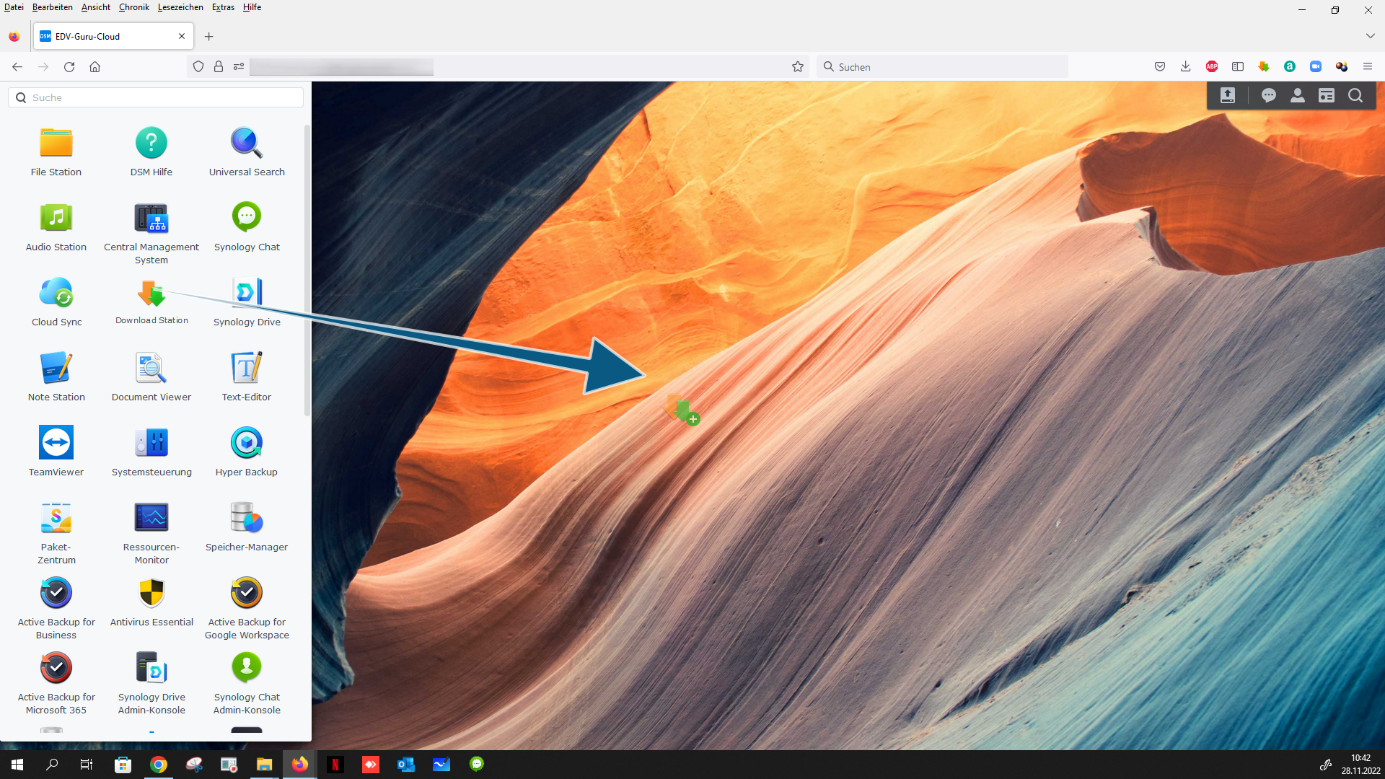
“Synology Drive” pull
Synology Drive Server is a complete solution for storing, managing, sharing and synchronizing files. It includes Synology Drive Admin Console for central management and monitoring, Synology Drive for file access via web portal, and Synology Drive ShareSync for synchronization between different Synology NAS.

“Note Station” pull
With Note Station you can write, view, manage and share content-rich notes. It's very easy to create content with rich text editing, media embedding, attachments and much more. Manage your notes using tags and group notes into notebooks. When you're ready, Note Station lets you easily and quickly share your content across social media platforms. Create, share and enjoy!

“Document Viewer” pull
With Document Viewer, different documents, from Microsoft Office to OpenOffice, can be viewed effortlessly and quickly. You can even easily share documents with an encryptable link.

“Text editor” pull
The text editor has comprehensive editing features that allow you to edit plain text format files, such as programming scripts and HTML files, directly in DSM.

“Hyper Backup” pull
Hyper Backup enables comprehensive backup of shared folders, packages and LUNs on your Synology NAS with various backup destinations and backup versions. The restore is done via the uncomplicated version browser.

Active Backup for Business pull
Active Backup for Business is designed to be a comprehensive, centralized data backup solution to help you protect office PCs, virtual machines, physical servers, and file servers.

“Antivirus Essential” pull
Antivirus Essential is a free and easy-to-use package that protects your Synology NAS and files from viruses. Please note that installing this package may affect performance on models with less than 512 MB of RAM.

Active Backup for Google Workspace pull
Active Backup for Google Workspace offers a centralized interface with auto-discovery for easy backup and management of personal and shared drives, continuous data backup to minimize the risk of data loss, the Active Backup for Google Workspace portal for efficient recovery, and much more.

Active Backup for Microsoft 365 pull
Active Backup for Microsoft 365 is a central solution with automatic account discovery for efficient backup and management of data, continuous data protection to minimize the risk of data loss, easy data recovery using the Active Backup for Microsoft 365 portal and much more.

“Snapshot Replication” pull
Snapshot Replication is a dedicated data backup and restore feature with point-in-time copy mechanism. Companies need to protect their data to prevent loss due to accidental deletion, application crashes, data corruption, and viruses.

“Docker” pull
Docker is a lightweight virtualization application that allows you to run thousands of containers built by developers around the world in DSM. You can search for applications from other talented developers in the hugely popular built-in image repository Docker Hub.

“media server” pull
Media Server provides you with a multimedia service for browsing and playing multimedia content on Synology NAS via DLNA/UPnP home devices. With Media Server you can easily connect devices such as: For example, you can connect televisions and stereo systems to your home network and transfer multimedia files stored on the Synology NAS to devices to play music, photos and videos.

“OAuth Service” pull
OAuth Service is an open standard protocol to enable account authorization and authentication. It allows resource owners to authorize access to their server resources by third parties without disclosing their credentials. The package includes the OAuth 2.0 standard.

“SSO Server” pull
SSO Server provides a single sign-on architecture for integrating all your web applications. All you need to do is add SSO Server client scripts to the original login page of all your web applications. When users log in to one of your web applications using their username/password, they do not need to re-enter their credentials to access other web applications.

“VPN Server” pull
VPN Server offers a simple VPN solution that turns your Synology product into a VPN server, providing a secure method to connect to a private local LAN in a remote location. All PPTP, OpenVPN and L2TP services are supported.

“Web Station” pull
Web Station makes it easy to host and publish your website. Besides, after installing the PHP package, you can freely create dynamic websites for personal or business purposes.

“Synology Photos” pull
Synology Photos offers a range of smart and flexible features that help photography enthusiasts and everyday home users manage their photos with ease.

“Hyper Backup Vault” pull
Hyper Backup Vault allows another Synology server to back up data to this Synology NAS via Hyper Backup. Hyper Backup Vault also provides an overview of all data backup destinations on this Synology NAS.

Here you can edit your user and their information - click on button
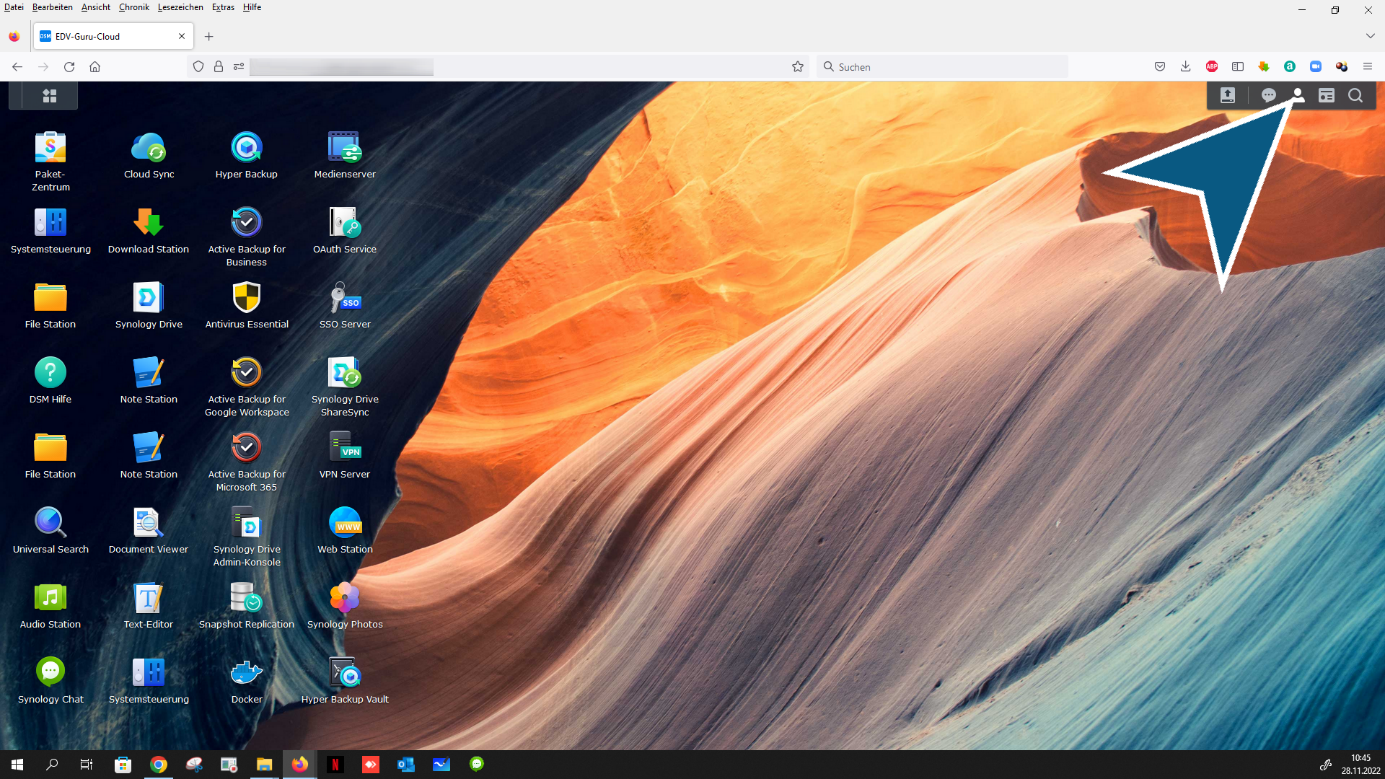
More server functions - click on “Widgets” button

State of your personal server - click on “Widgets” button

Click on “Show desktop” button, all open applications will be minimized

If you need help with the applications
Click on button - main menu

From the menu “DSM Help” select

Click “Instructions & FAQ” can be found here

Click “Help article for DSM and packages” Here you will find all detailed application descriptions

After clicking, you will find the following overview

You want to log out of your server - click on button

Click “Log out”
Done - end
